
Post-Purchase Instructions
Thank you for your order. Your request has been submitted and is being processed. Please follow the steps below once you receive your document.
1. Check Your Email
You will receive your DOCX document by email from support@atp-redactor.com within a few hours, up to 24 hours maximum. Check your inbox and spam folder.
2. Download the Document
Download the attached DOCX file and open it in Microsoft Word before making any edits.
3. Display the Table of Contents
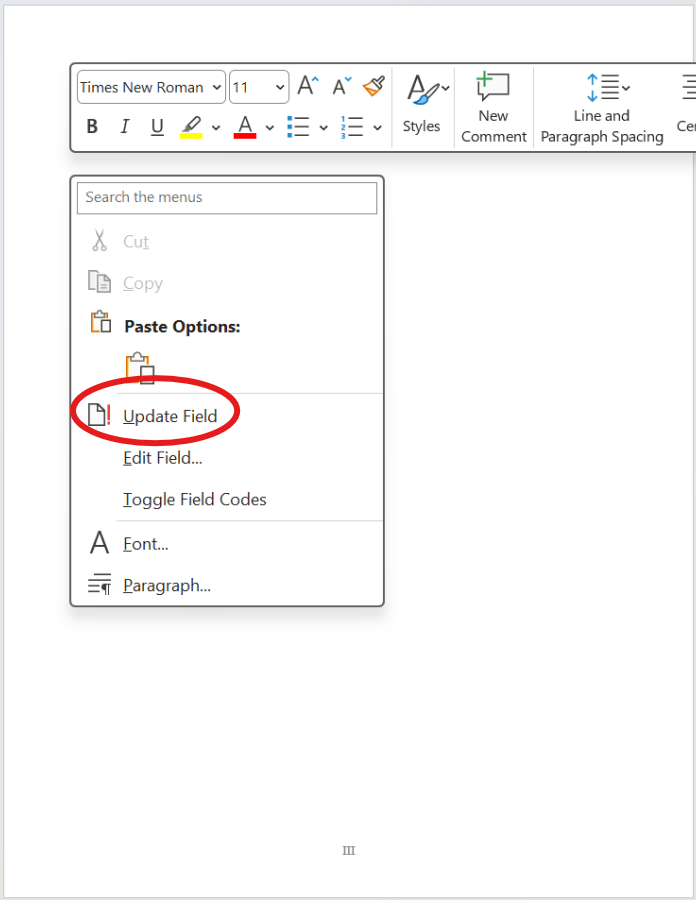
Right-click on the blank area below "Table of Contents" and select "Update Field" so the table appears correctly.

4. Remove Unnecessary Page Breaks
The DOCX can occasionally introduce unwanted page breaks. Read through the document and remove any page breaks that interrupt the normal flow of the paper.
5. Fill In the First Page Placeholders
Replace the placeholders on the first page with your official information and sign the declaration of authorship. If your title is too long and pushes the date onto a new line or page, remove an empty line so everything fits correctly on the first page.
6. Check the References Section Carefully
Review the references for style and completeness. Metadata extraction can occasionally miss the exact journal name or forget an author, so this section should always be checked manually.
7. Adjust the Auxiliary Table
We recommend changing the auxiliary table slightly. There is no academic risk in keeping it, but if everyone leaves it exactly unchanged, it can hint that the same tool was used.
Need Assistance?
If you encounter any issues or have questions about your document, you can contact support@atp-redactor.com at any time.